

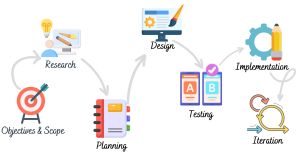
Attractive screens are just a portion of the Digital Product design process. Successful experiences in real projects are developed in a research, planning, testing and iterative fashion. That’s why the process of ui ux design is important.
Many businesses are just concerned with the visuals and not user behavior. Based on the experience of working with UI/UX Design services, there’s a certain recurring pattern. Structured design process leads to better usability, easier development and fewer revisions in projects.
The UI UX Design Process for Beginners is a framework that converts ideas into functional experiences. It can be as simple as designing a website (UI/UX), conducting UX research & user flow design, or even going through a whole digital product development.
The guide discusses the Stages of UI UX Design Process adopted by professional designers and the way that UI/UX Design services are provided in practice.
In this course, students will learn the basics of UI/UX design. In this course, students will learn the fundamentals of UI/UX design
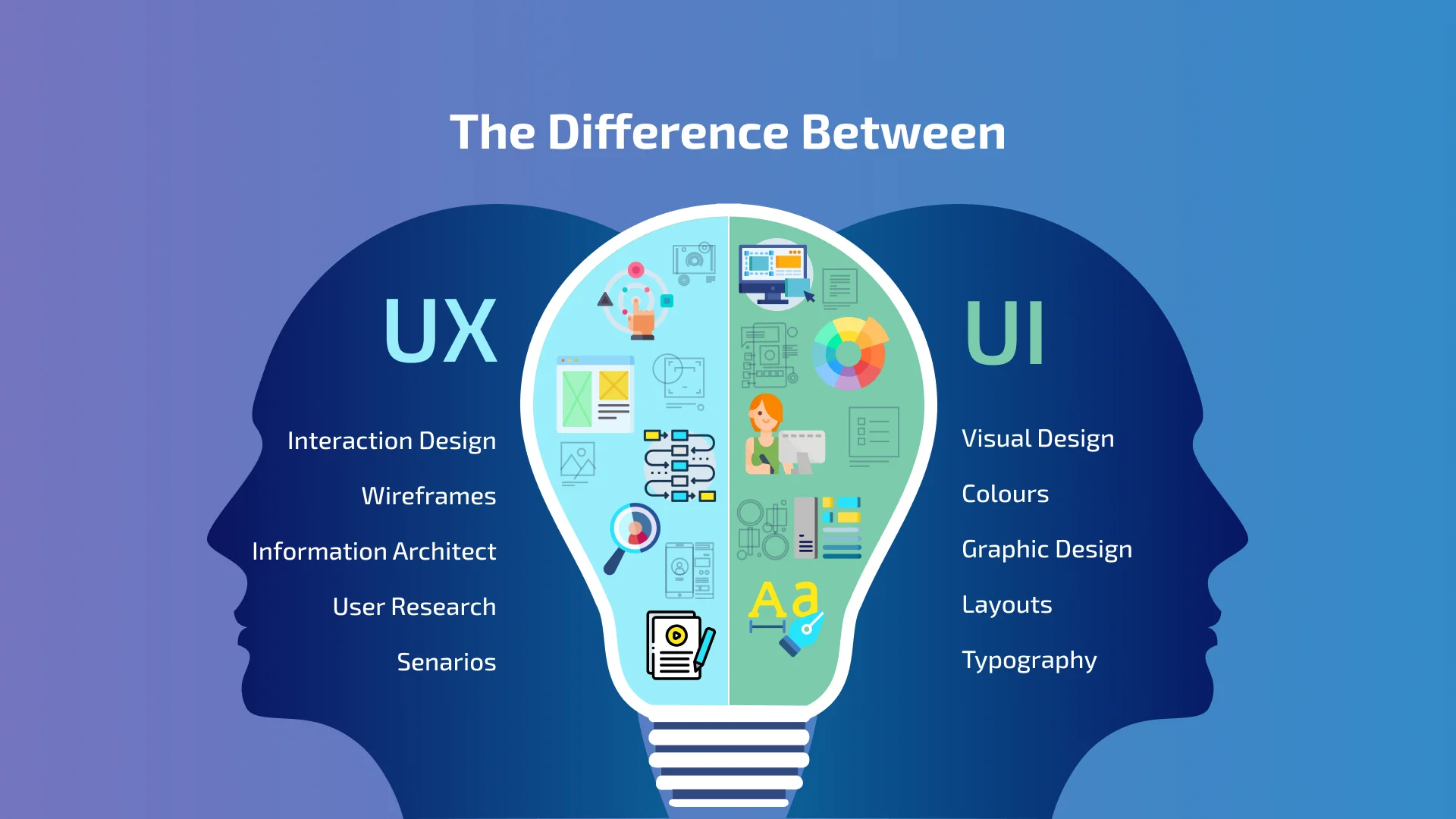
It’s crucial to understand the difference between UI and UX before going into the design process.
What is UI Design?
User Interface Design focuses on visual elements users interact with.
These include:
- Buttons
- Typography
- Colors
- Layouts
- Icons
- Visual consistency
The look of a product is determined by UI Design.
What is UX Design?
User Experience Design is about the ways a product works and how a user feels when using it.
UX includes:
- Research
- User flows
- Information architecture
- Usability
- Accessibility
- Problem solving
UX determines how a product works.
Why the UI UX Design Process Matters
The ui ux design process is not just a design trend. It provides practical benefits:
- Better user satisfaction
- Reduced redesign costs
- Faster development
- Improved conversions
- Clear communication between teams
The ability to expand to meet future needs. Potential future growth. Very few professional designers begin designing visuals straight away. Rather, they go through systematic procedures
Importance of Following a Structured UI UX Design Process
Projects without structure often suffer from:
- Endless revisions
- Confusing interfaces
- Poor usability
- Increased costs
- Development delays
Following a proper UI UX Design Process for Beginners helps avoid these issues.
User Satisfaction
Good experiences encourage users to:
- Stay longer
- Explore more pages
- Return again
- Complete desired actions
User satisfaction remains one of the primary goals of every ui ux design process.
Business Goals Alignment
Design should support business objectives rather than personal preferences.
Professional teams align design decisions with:
- Lead generation
- Product sales
- Brand awareness
- Customer retention
Reduced Development Errors
Research and planning identify problems before development begins.
This reduces:
- Rework
- Coding changes
- Miscommunication
- Unexpected expenses
Better Conversion Rates
A structured design process improves:
- Navigation
- Call-to-action visibility
- Form completion rates
- Overall usability
Site Assessment Before Starting UI/UX Projects
Evaluation is also a vital aspect of the Professional UI/UX Design services. One of the most frequent reasons for project failure is to skip this step.
Existing Website Analysis
If a website already exists, teams evaluate:
- Current usability problems
- User complaints
- Bounce rates
- Navigation issues
- Mobile responsiveness
Understanding existing weaknesses provides direction for improvements.
Business Requirement Gathering
Professional designers identify:
- Project objectives
- Target audience
- User expectations
- Functional requirements
Without clear requirements, the ui ux design process becomes difficult to manage.
Competitor Research
Competitor analysis helps teams understand:
- Industry standards
- Common user expectations
- Design trends
- Opportunities for improvement
However, copying competitors directly is rarely recommended.
Technical Constraints Evaluation
UI/UX specialists also examine:
- Existing platforms
- CMS limitations
- Development capabilities
- Budget restrictions
Design decisions must remain technically feasible.
UI/UX Design Scope Definition
Scope definition protects both the client and design team. One of the important Stages of UI UX Design Process is documenting expectations before design work begins.
Functional Requirements
Examples include:
- Login systems
- Search features
- Contact forms
- Ecommerce functionality
User Requirements
Teams define:
- User goals
- Pain points
- Expected actions
- Accessibility requirements
Content Requirements
Design depends heavily on content.
Teams identify:
- Existing content
- Missing content
- Images and media assets
- Future content needs
Project Deliverables
Professional UI/UX Design services clearly define deliverables such as:
- User research reports
- Wireframes
- User flows
- High-fidelity designs
- Interactive prototypes
Clear scope prevents misunderstandings later.
UX Research and User Flow Design
Research is one of the most important Stages of UI UX Design Process. Without research, design decisions become assumptions.
User Interviews
Designers gather information from users to understand:
- Problems
- Expectations
- Frustrations
- Behavioral patterns
Research helps create experiences based on real data rather than opinions.
User Personas
Personas represent ideal users. Typical information includes:
- Age
- Profession
- Goals
- Challenges
- Digital habits
Personas guide every stage of the ui ux design process.
Customer Journey Mapping
Journey maps are used to identify the interactions between users and the product. This reveals:
- Friction points
- Opportunities
- Conversion obstacles
Customer journey mapping is particularly important in UI UX Design Process for Beginners because it creates empathy for users.
User Flow Creation
User flows explain the way users navigate the system.
Examples include:
- Homepage → Product Page → Checkout
- Landing Page → Form → Confirmation
- Login → Dashboard → Profile Settings
UX Research & User Flow Design services heavily focus on these interactions.
Information Architecture Planning
Information architecture organizes content logically. Poor structure creates confusion even when visual design looks attractive.
Content Organization
Teams categorize:
- Main pages
- Supporting pages
- Blog sections
- Product categories
Logical organization improves usability.
Navigation Structure
The user should be able to find information easily.
Professional designers prioritize:
- Simplicity
- Predictability
- Consistency
Page Hierarchy
Page hierarchy determines:
- Primary pages
- Secondary pages
- Supporting content
Clear hierarchy equals user experience and SEO.
Wireframing Process
Wireframes are the skeletal framework of a design. This stage is among the most useful Stages of UI UX Design process simply because the changes can be made easier and more affordable prior to the visual design phase.
Low-Fidelity Wireframes
These simple layouts help teams:
- Test ideas quickly
- Discuss page structure
- Avoid unnecessary visual distractions
Layout Validation
Designers confirm:
- Element placement
- Navigation flow
- User priorities
Making changes in wireframing saves a lot of development costs later.
Early User Feedback
Professional teams receive feedback before moving on to visual design. This reduces revisions and enhances the quality of the overall UI UX design process.
The commercial services are provided by the main UI/UX
Businesses normally ask for a number of kinds of UI/UX Design services.
Website Design (UI/UX)
These services include:
- Complete page designs
- Responsive layouts
- Conversion-focused interfaces
UI Design Services
UI Design projects mainly focus on:
- Colors
- Typography
- Components
- Visual consistency
UX Research & User Flow Design Services
These services focus on:
- User interviews
- Personas
- Journey mapping
- User flows
Research-based services enable companies to make informed design decisions.
Visual UI Design
If the UX research, wireframes and structure are approved, then visual design is the next phase. Here the product begins to resemble a real digital interface.
In a professional ui ux design process, this is not a decoration work. It’s a system that outlines how the user will experience it, what it will look like, and what it will feel like.
Typography Selection
Typography is much more than selecting fonts. It impacts on readability, tone and user trust.
Design teams evaluate:
- The use of font hierarchy (H1, H2, body text)
- The whole page is readable on mobile and desktop.
- Brand alignment
- The spacing between the lines and how light or dark they are.
Typography errors resulting from lack of knowledge of usability are not uncommon in UI UX Design Process for Beginners.
Colour Systems
Colour selection is strategic in the ui ux design process.
Professional teams build:
- Colour Palettes: Primary and secondary.
- Use of functional colours (success, error, warning)
- Accessibility-compliant contrast ratios
Not choosing colours properly can result in accessibility issues and poor conversions.
Component Libraries
Modern UI/UX Design services have been based on reusable components.
These include:
- Buttons
- Forms
- Cards
- Navigation bars
This will be consistent throughout the product and will save development time later in the development.
Design Consistency
The Stages of UI UX Design Process involves the following principle: Consistency.
Design systems ensure:
- Same spacing rules across pages
- Uniform interaction patterns
- Predictable user behaviour
Even an eye-catching product seems befuddling when it’s not consistent.
Interactive Prototyping
Prototyping brings designs to life and turns them into an interactive experience. It is a crucial step in the ui ux design process as it mimics actual user interaction through the design phase without any actual development taking place.
Clickable Prototypes
Tools like Figma or Adobe XD are used to create:
- Navigation flows
- Button interactions
- Page transitions
This helps stakeholders experience the product before it is built.
User Testing
User testing validates design decisions early.
Real users are asked to:
- Complete tasks
- Navigate flows
- Identify confusion points
In UI UX Design Process for Beginners, skipping testing is one of the biggest mistakes.
Feedback Collection
Feedback is collected from:
- Users
- Stakeholders
- Product teams
This feedback is used to refine the ui ux design process before development starts.
Design Handoff to Developers
After approval, designs are transferred to development teams. A strong handoff reduces misunderstandings and development errors.
Developer Documentation
Designers provide:
- Design specifications
- Interaction notes
- Responsive behavior rules
Design Systems
Professional UI/UX Design services deliver structured design systems including:
- UI components
- Style guides
- Interaction patterns
This ensures developers can implement designs accurately.
Asset Preparation
Assets include:
- Icons
- Images
- SVG files
- Fonts
Development efficiency is increased when developed in a proper manner.
Quality Assurance and Continuous Improvement
There is no end to the real-world ui ux design process. It continues with testing and optimization.
Usability Testing
After launch, teams analyze:
- User behavior
- Drop-off points
- Conversion rates
Accessibility Review
Designs are checked for:
- Screen reader compatibility
- Color contrast issues
- Keyboard navigation support
Accessibility is a major part of modern Stages of UI UX Design Process.
Cross-Device Testing
Products must work across:
- Mobile devices
- Tablets
- Desktop screens
- Different browsers
Continuous Optimization
Based on analytics, improvements are made such as:
- UI adjustments
- Flow simplification
- Conversion improvements
This turns the ui ux design process into a perpetual cycle, instead of a one-off.
Cost vs UI/UX Design Quality
Budget plays a major role in project outcomes.
Budget Limitations
Low-budget projects often face:
- Limited research
- Fewer iterations
- Reduced testing
This directly affects the ui ux design process quality.
Premium Design Approach
High-quality UI/UX Design services include:
- Deep user research
- Multiple design iterations
- Advanced usability testing
Long-Term ROI
Good UI/UX design reduces:
- Development rework
- User drop-off
- Customer support issues
Investing in a structured ui ux design process improves long-term business performance.
Main UI/UX Commercial Services vs UI Design
Not all projects require full UX work.
Complete UI/UX Projects
These include:
- Research
- UX design
- UI design
- Testing
This is the full ui ux design process approach.
UI-Only Projects
Focus only on visual improvements:
- Layout updates
- Style changes
- Branding adjustments
No deep UX research is involved.
Choosing the Right Service
Businesses choose based on:
- Budget
- Project complexity
- User experience requirements
Small Contracts vs UI/UX Design Agency Management
Different project sizes require different working models.
Freelancers
Suitable for:
- Small UI fixes
- Basic interface design
Limitations:
- Less scalability
- Limited research capacity
Small Teams
Offer balanced solutions:
- UI + basic UX
- Faster delivery
Full-Service Agencies
Best for full ui ux design process execution:
- UX research teams
- UI designers
- QA specialists
- Project managers
Expert Levels and Scalability
Experience level impacts design quality significantly.
Junior Designers
- Focus on UI execution
- Limited UX decision-making
Mid-Level Designers
- Handle flows and interfaces
- Participate in research
Senior UI/UX Specialists
They lead the entire ui ux design process, including:
- Strategy
- UX architecture
- Business alignment
- Scalability planning
How Agencies and Procurement Teams Select UI/UX Design Services
Businesses do not select designers randomly. They follow structured evaluation.
Portfolio Evaluation
Teams check:
- Real project experience
- UX thinking process
- Problem-solving ability
Technical Experience
Agencies must understand:
- UX research methods
- Design systems
- Development collaboration
Communication Process
Clear communication is critical in the ui ux design process. Teams evaluate:
- Responsiveness
- Clarity of documentation
- Collaboration workflow
Scalability Considerations
Companies prefer teams that can:
- Handle large projects
- Scale design systems
- Support long-term updates
Designing a user interface, or user experience, is a systematic process that takes an idea and turns it into a usable digital experience. It includes research, planning, wireframing, UI design, prototyping, testing, and continuous improvement.
While the UI UX Design Process for Beginners can be useful to get to know the basics, in reality, it takes experience, established workflows, and collaboration between the design and development teams to successfully design and build a user experience.
Every decision made in the Stages of UI UX Design Process is user-centric, data-driven and business goal-oriented. If done correctly, UI/UX Design helps you save a lot of money, make your products easier to use, and deliver long-term success.
Frequently Asked Questions
Why is the ui ux design process important?
The ui ux design process is important because it ensures that digital products are built based on research, not assumptions. It improves usability, reduces development errors, and aligns design with business goals. Without it, products often become confusing and inefficient for users.
What are the main Stages of UI UX Design Process?
The main stages include research, information architecture, wireframing, UI design, prototyping, testing, and continuous improvement. Each stage plays a role in shaping user experience and ensuring the final product is functional and user-friendly.
What is UI UX Design Process for Beginners?
UI UX Design Process for Beginners is a simplified learning approach that focuses on understanding users, creating basic wireframes, designing simple interfaces, and testing usability. It helps new designers understand how real projects are structured.
How long does a UI/UX design process take?
The timeline depends on project complexity. Small projects may take 2–4 weeks, while complex products can take several months. The ui ux design process duration is influenced by research depth, revisions, and testing cycles.
What tools are used in UI/UX design process?
Common tools include Figma, Adobe XD, Sketch, and prototyping tools. These tools help designers create wireframes, UI designs, and interactive prototypes that simulate real user experiences.
Why is UX research important in the ui ux design process?
UX research is important because it provides real user data. It helps designers understand user behavior, pain points, and expectations, which leads to better design decisions and improved product usability.
What is the difference between UI and UX in the design process?
UI focuses on visual design like colors, typography, and layout, while UX focuses on user experience, behavior, and functionality. Both work together in the ui ux design process to create a complete product experience.